
Before you start, go to the Pacific Barcode website and look at the different thermal printers we offer
https://pacificbarcode.com/product-category/thermal-printers/
Pacific Barcode primarily sells Zebra, TSC, Printronix (a division of TSC), and GoDEX.
There are two thermal printing methods: direct thermal and thermal transfer. Each method uses a thermal printhead that applies heat to the surface being marked. Thermal transfer printing uses a heated ribbon to produce durable, long-lasting images on a wide variety of materials. No ribbon is used in direct thermal printing, which creates the image directly on the printed material. Direct thermal media is more sensitive to light, heat, and abrasion, which reduces the life of the printed material.
Thermal transfer printers can accept a wider variety of media than direct thermal models, including paper, polyester, and polypropylene materials. Thermal transfer printers can create extremely durable wristbands, asset tags, and certification labels, in addition to common labels, tags, and tickets. The specific label material and ribbon must be carefully matched to ensure print performance and durability.
By selecting the right media-ribbon combination, as well as specialty adhesives, users can create archival-quality labels to withstand temperature extremes, ultraviolet exposure, chemicals, sterilization, and more. Typical thermal transfer applications include product identification; circuit board tracking; permanent identification; sample and file tracking; asset tagging; inventory identification; certification labels such as UL/CSA; laboratory specimens; cold storage and freezers; and outdoor applications.
Direct Thermal
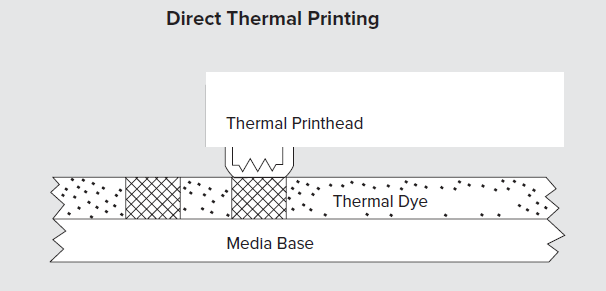
Direct thermal printing uses chemically treated, heat-sensitive media that blackens when it passes under the thermal printhead. Direct thermal printers have no ink, toner or ribbon. Because there is no ribbon, direct thermal printers cost less to operate than thermal transfer models. Direct thermal media images can fade over time and, if the label is overexposed to heat or light, the material will darken and make the barcode unreadable.
Thermal Transfer

With thermal transfer printing, a thermal printhead applies heat to a ribbon, which melts onto the label material to create the image. Because of the heat, the material transferred from the ribbon to the label material is absorbed into the material being printed so the image becomes part of the label. This technique provides long-lasting image quality and durability. Thermal transfer printers accept a wider variety of media than direct thermal models, including paper, polyester and polypropylene materials. Thermal transfer printers use either wax or resin ribbons. Wax is the most common, less expensive option and is suitable for many labeling applications. Resin ribbons provide more heat and chemical resistance and are used with synthetic label materials. Resin enhanced wax ribbons combine qualities of each and provide outstanding performance on many label materials.
Printer Categories
Thermal printers are broken into three basic categories based on how they are being used.
- Portable printers are used for printing delivery receipts and invoices on the go.
- Desktop printers are made for smaller volume applications where you are making labels for shipping, light retail, or office applications.
- Industrial Printers are larger, more durable, and rugged and are used in high volume applications. Volumes of labels can range from a few labels a day to printing all day long, thousands and thousands of labels. Pacific Barcode has printers that support the printing of labels ranging from 0.5″ all the way to over 8″ wide. Pacific Barcode primarily sells Industrial Printers.
Dots Per Inch
DPI stands for Dots Per Inch Thermal printers come in three main print resolutions, 203 dpi, 300 dpi, and 600 dpi.DPI represents the number of dots that can be used to print a barcode, symbol, text or image. The numbers stand for the number of dots that are available. The more dots there are the clearer the text and graphics. If you were printing a one-inch label at 203 dots per inch, you have 203 rows of 203 dots totaling 41,209 available dots. 300 dpi gives you 300 rows of 300 dots totaling 90,000 dots and 600 dpi gives you 600 rows of 600 dots 360,000 dots. From this example, you can see that 300 dpi has 2.18 times more dots than 203 dpi giving you a better image and 600 dpi has 4 times more dots than 300 dpi.
Label Width
Printers come in a variety of widths
Portable can typically print 2 or 3″ labels
Desktop are usually capable of printing 2: or 4″ widths
Industrial are capable of printing 4″,6″ and 8″
Not all brands have all widths available
Print Clarity
203 meets the needs of many print labels like shipping labels and larger barcode labels.
For things like Medical Device or Electronic Product labels where there are many small graphical components, you need a printer capable of a higher resolution.
Thermal Printers come primarily come in three DPI variations: 203, 300 and 600 dpi.
Print Speed
As dpi increases print speed decreases – A 203 dpi printer will print much faster than a 600 dpi printer.
The TSC TTP-2410MU will print at 14 inches per second (203dpi), the TSC TTP-346MU will print at 10 inches per second (300 dpi) and the TSC TTP-644MU will print at 4 inches per second (600 dpi).
Label Formats
The overall label format that you are printing along with the size of the label is very important to consider when selecting the dpi of a label printer. The smaller the text and images, the higher the dpi is required to read and scan.
How to select the right printer.
There are a number of considerations when selecting the right thermal printer including:
- How long do the labels need to last?
- What will be the maximum width of the label?
- How many labels will be printed per day?
- Will the labels contain fine graphics and small fonts?
- Do you want to be able to print labels without connecting to a PC?
- How do you want to connect to your computer? Bluetooth, network, USB?
- Monochrome or full-color screen.